Automatic Updates
Last updated: August 6, 2026
How automated tracking and updates work across AI engines
How Automatic Updates Work
Rankscale automatically refreshes your brand tracking data at scheduled intervals. When you configure a search term with an automatic update frequency, the system runs queries against all selected AI engines — including Google AI Overviews, ChatGPT, Gemini, Perplexity, Claude, and others — without any manual intervention.
Each automatic update collects fresh visibility scores, rankings, sentiment data, and competitor mentions, keeping your dashboard up to date with the latest AI search landscape.
Set & Forget
Once you configure your search terms with the desired update frequency, Rankscale handles everything automatically. Your dashboard will always reflect the latest data without needing to manually trigger runs.
When Do Automatic Updates Happen
You can set each search term to update at one of the following frequencies:
Hourly: Updates every hour — ideal for time-sensitive terms during campaigns or product launches
Daily: Updates once per day — recommended for core brand terms you want to monitor closely
Weekly: Updates once per week — suitable for secondary terms or broader industry tracking
Monthly: Updates once per month — best for low-priority terms or long-term trend analysis
Processing Time
Automatic updates may take a few minutes to complete depending on the number of search terms and AI engines being queried. During peak times, processing may be slightly delayed but all runs will be completed.
Aggregation Accuracy
For the most accurate dashboard aggregations and trend charts, keep update intervals consistent within each topic. Mixing hourly and weekly intervals in the same topic can produce uneven data points that make trends harder to interpret.
Manual Updates
In addition to automatic scheduling, you can trigger manual updates at any time. This is useful when you need fresh data immediately — for example, after publishing new content, launching a campaign, or responding to a PR event.
Manual Run Details
Trigger from the Search Terms section
Choose to run individual terms or all terms at once
Results appear in your dashboard once processing completes
Manual runs consume the same credits as automatic ones
Processing Times
Single term: typically completes within 1–2 minutes
Batch runs: may take 5–15 minutes depending on volume
GUI-based engines (Beta): may take slightly longer than API-based ones
Results are available as soon as each individual term finishes
Best Practice
Use manual runs strategically — for example, after publishing a major blog post or press release, trigger a manual update to see how quickly the new content affects your AI visibility.
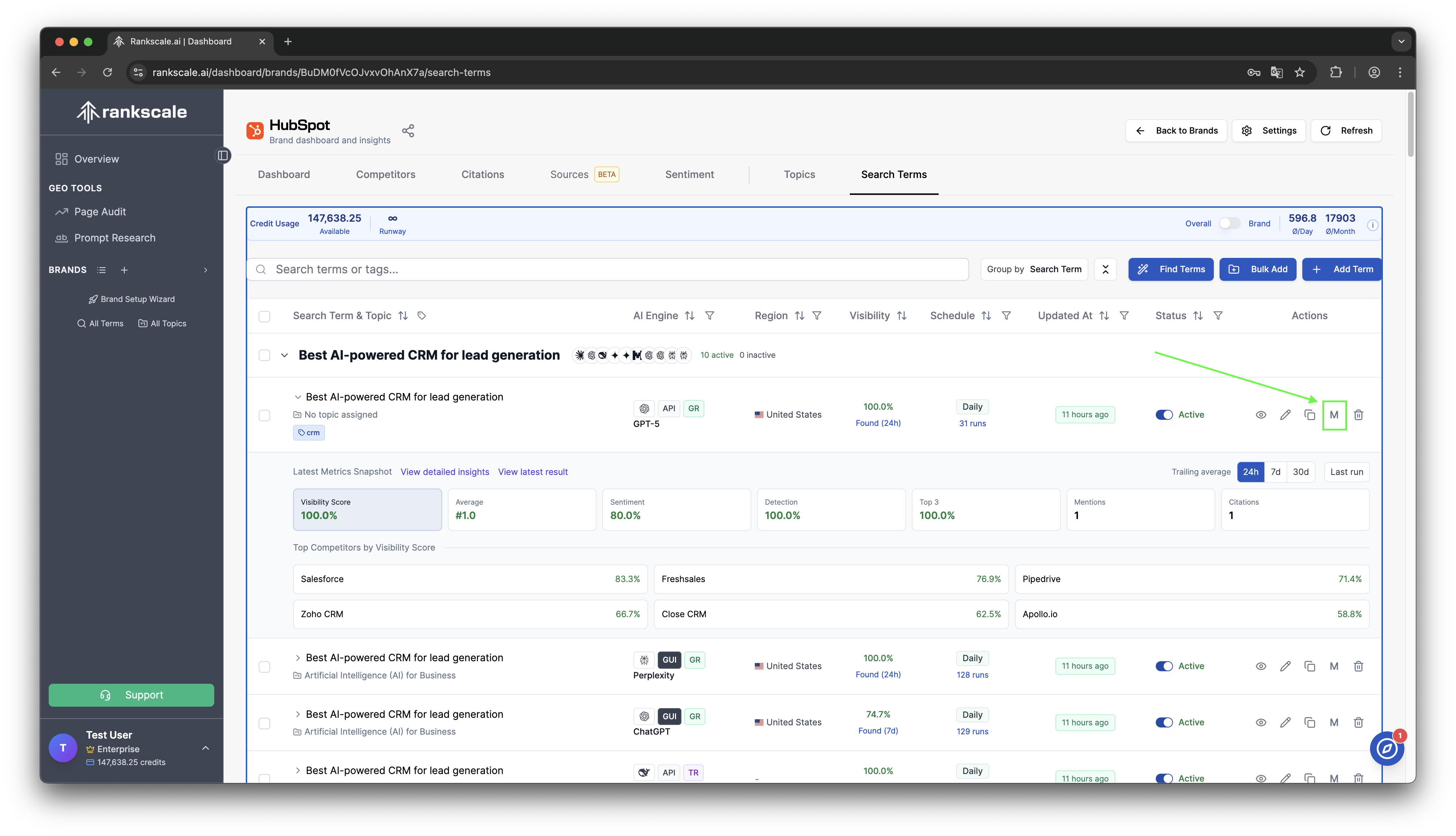
Manual Update Interface in Rankscale
Credit Management
Every update — whether automatic or manual — consumes credits. Here’s how credit usage works:
💳One credit per engine per term: Each search term queried against each AI engine counts as one run and consumes credits based on the engine type
📅Monthly reset: Credits reset each billing cycle — unused credits do not roll over to the next month
📊Runway indicator: Check your credit runway to see how many days of automatic updates you have left at your current usage rate
Learn More About Credits
For a full breakdown of credit costs per AI engine and tips on optimizing your credit usage, see 📄 Understanding Credits and Usage
Update Management Tips
Frequency Optimization
Set core brand terms to daily updates for consistent monitoring
Use weekly or monthly for secondary or exploratory terms
Reserve hourly updates for time-sensitive campaigns only
Review and adjust frequencies quarterly based on credit usage
Performance Tips
Keep update intervals consistent within each topic for clean data
Monitor your runway indicator to avoid running out of credits
Pause updates on terms that are no longer strategically relevant
Use manual runs for ad-hoc checks instead of increasing frequency
Troubleshooting Updates
My automatic updates seem delayed.
During high-traffic periods, updates may take slightly longer to process. All scheduled runs will complete — check back in a few minutes.
A search term shows no new data after an update.
This can happen if the AI engine did not mention your brand for that term. The run still consumed credits, but there was no brand detection to report.
My credit balance dropped faster than expected.
Review your update frequencies and the number of AI engines per term. Each engine counts separately. Consider reducing frequency on less critical terms.
Can I pause automatic updates temporarily?
Yes — change the update interval to “Manual” for any term you want to pause. You can re-enable automatic updates at any time.