Managing your Competitor Tab
Last updated: April 2, 2026
RankScale uses auto-discovery to identify and track competitors that appear in AI responses alongside your brand. This article explains how to review competitor names, add brand variations, and control which competitors are tracked.
Name Variations
When you open the competitor management view, you can see the name variations that are included in your brand tracking. AI engines sometimes refer to the same brand in different ways, and RankScale groups these variations together so your data stays consistent.
If you need to add additional brand name variations for your own brand, you can do this in your Brand Settings. See 📄 Managing Brand and Product Namesfor details.
Allow and Deny List
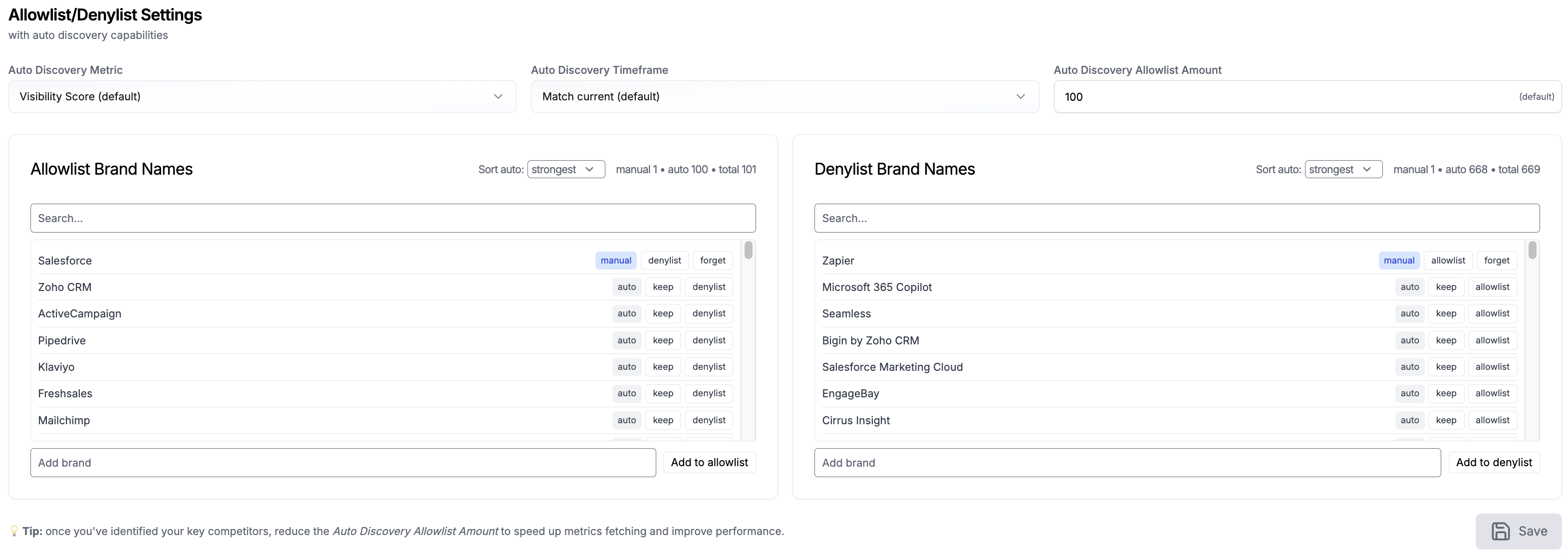
At the bottom of the page, you will find the Allow and Deny List. This gives you full control over which competitors RankScale tracks:
Adding competitors manually: If auto-discovery has not picked up a competitor you want to track, add them to the allow list. They will be included in your competitor tracking going forward.
Removing unwanted competitors: If auto-discovery has picked up a brand that is not a relevant competitor, add them to the deny list. They will be excluded from your competitor data.
This way, you always have a clean and relevant set of competitors without relying solely on auto-discovery.